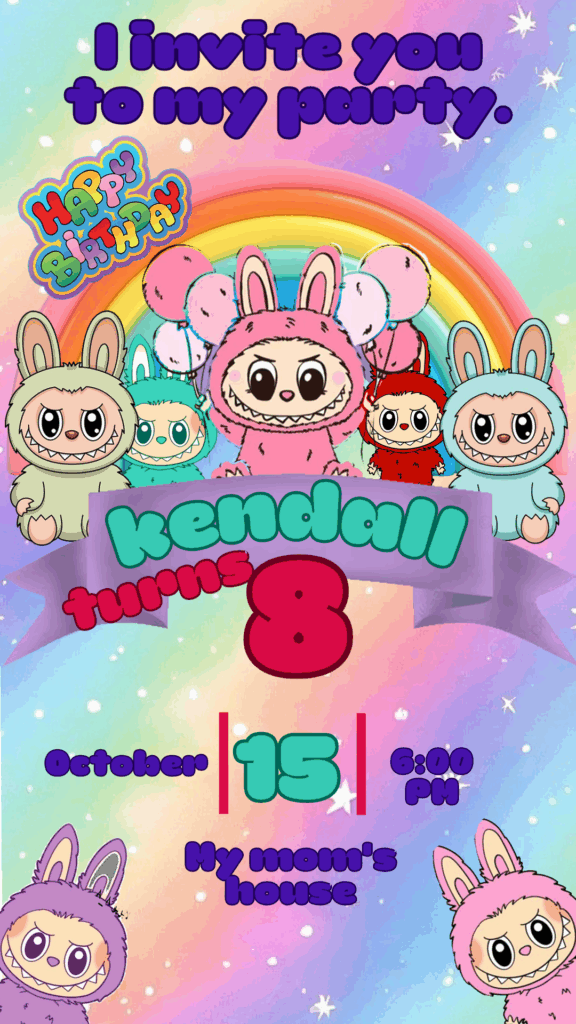
The adorable yet mischievous character Labubu—known for its fuzzy charm and devilish grin—is one of the most beloved art toys from Pop Mart. If your child is a fan of this cute but naughty creature, you need a birthday invitation that matches the collectible, whimsical style. We offer you a dedicated Labubu Birthday Card editable in Canva, completely free to access and ready for instant personalization. Forget about complicated design software; use this Canva-adapted template to easily create a unique, trendy, and visually appealing invitation that sets the tone for a fun and stylish celebration.
Why Choose an Editable PSD Template?
While our platform specializes in professional, high-fidelity templates in PSD format (which requires Adobe Photoshop for superior control over every design layer), we have strategically adapted this popular design for Canva with accessibility and speed in mind. The main advantage of using a Canva template is its superior ease of use. You do not need to install Adobe Photoshop or possess advanced graphic design knowledge. Canva is a free, web-based tool, meaning you can edit the invitation directly from your browser, tablet, or phone. Its intuitive system allows you to modify texts, upload the birthday child’s photo, and adjust colors to perfectly match the cute and mischievous aesthetic of Labubu quickly and efficiently.
Main Features of This PSD Template
Our Labubu birthday card template, adapted for Canva, was designed to evoke the collectible toy’s distinctive look and feel, often utilizing cute, slightly dark, and quirky design elements. The design is:
- 100% Editable in Canva: Modify every element without the need for desktop software.
- Collectible Art Toy Style: Optimized structure that features bold character visuals, whimsical text, and a distinct color palette.
- High-Resolution: Perfect for printing as a physical card or for clear digital sharing across all messaging platforms.
- User-Friendly: Designed for quick text replacement and simple customization of the party’s theme and details.
How to Personalize Your Plantilla PSD
Follow these simple steps to customize your Labubu birthday card using the Canva platform:
- Descarga el Archivo (Get the Link): Click the download button to get the direct link to the Canva template.
- Descomprímelo (Skip This Step): This step is unnecessary for Canva templates. Simply click the link and proceed.
- Abre el archivo PSD (Open the Template): Click the link and then hit the “Use Template” button. Canva will automatically open an editable copy of the template in your account.
- Instala la fuente (No Installation Needed): The fonts used are included in the standard Canva library and will load automatically. (Note: If you want to use the original PSD template, it does not include the fonts, but the download contains a TXT document where we provide the direct download link. If you are using the PSD file and need help installing fonts for Photoshop, please refer to this video tutorial, which will open in a new tab: How to Install Fonts for Photoshop).
- Edita las capas y textos (Edit Layers and Texts): Click on any text box to change the birthday child’s name, age, the date, time, and the party location. Use thematic phrases related to toys, collectibles, or cute mischief.
- Guarda y exporta (Save and Export): Once your design is finished, go to the “Share” button at the top right, and select “Download.” Choose PDF Print (for physical cards) or PNG/JPG (for mobile distribution).
Consejos (Tips)
- Quirky Typography: Choose fonts that are playful, slightly handwritten, or bold to match the Labubu aesthetic.
- Color Pops: Use pastel colors or vibrant neons against a neutral background to make the character and text stand out.
- Mischievous Theme: Encourage guests to dress up in character or include a small note about the collectible theme.
Frequently Asked Questions
- Is Adobe Photoshop required? No. This template is adapted for exclusive use in Canva and does not require any desktop design software.
- Can I upload images of different Labubu versions? Yes. You can easily upload images of various Labubu figures (like Zimomo, Tycoco, etc.) to place on the invitation.
- Is the template really free? Yes, this template is available for use and download completely free of charge.
Call to Action for Editing
Get ready for a collectible party! Download your Labubu Birthday Card editable in Canva now and create a stylish and fun invitation. Start customizing the celebration today!