Introduction
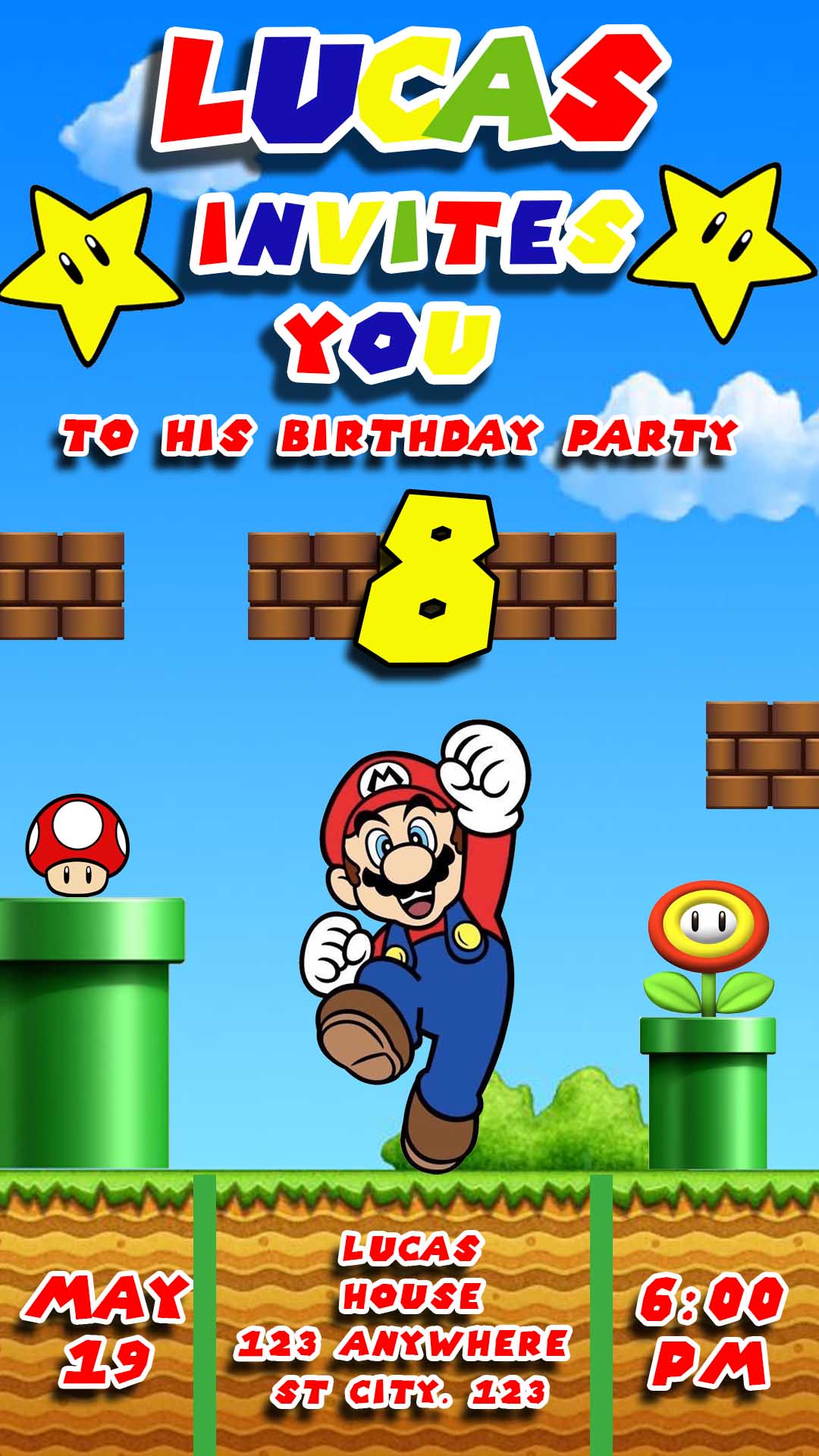
Planning a super birthday bash for your little Mario fan? Get ready to power up your party planning! Our fantastic collection of tarjeta de invitacion de mario en PSD templates is here to make your invitations as exciting as a trip through the Mushroom Kingdom. Designed with iconic characters and fully editable in Adobe Photoshop, these templates are perfect for creating memorable invitations for printing or digital sharing. Let’s-a go!
Why Choose an Editable PSD Template?
For those who want a high level of customization and professional-quality results, choosing an editable PSD template for your tarjeta de invitacion de mario en PSD is the way to go. PSD files offer complete control over every design element, allowing you to tailor the invitation to your exact vision using the power of Adobe Photoshop. If you’re familiar with Photoshop or looking for the most flexibility, PSD templates are the ultimate power-up for your party planning.
Main Features of This PSD Template
Our tarjeta de invitacion de mario en PSD templates come loaded with super features for a truly customizable experience:
- High-Quality Mario Designs: Featuring beloved characters like Mario, Luigi, Princess Peach, and more!
- Fully Layered PSD Files: Offering complete control over text, images, colors, and other design elements within Photoshop.
- Editable Text Layers: Easily personalize with the birthday child’s name, age, party date, time, location, and RSVP details.
- Organized Layers: Making it easy to navigate and modify specific elements within the Photoshop file.
- Print-Ready Resolution: Designed with high resolution for crisp and professional printing results.
- Versatile for Digital Sharing: Once customized, you can easily export the design in various formats for online sharing.
- Font Link Included: A dedicated text file provides a direct link to download the specific fonts used in the design (fonts not included in the PSD).
- Font Installation Tutorial Link: For users new to Photoshop, we’ve included a link to a helpful video tutorial on how to install fonts for use in Photoshop: https://www.youtube.com/watch?v=XE5jgJ0KnwA (Opens in a new tab).
How to Personalize Your PSD Template
Customizing your tarjeta de invitacion de mario en PSD in Adobe Photoshop gives you ultimate creative control. Follow these steps to create your perfect invitation:
Descarga el Archivo:
Download the ZIP file containing the tarjeta de invitacion de mario en PSD template and the accompanying font link file.
Descomprímelo:
Unzip the downloaded file to access the PSD template and the text file with the font link.
Abre el archivo PSD:
Open the .PSD file in Adobe Photoshop. Ensure you have Adobe Photoshop installed on your computer.
Instala la fuente:
Open the .txt file containing the font link. Follow the provided link to download the fonts used in the template. If you’re unsure how to install fonts, watch this helpful video tutorial: https://www.youtube.com/watch?v=XE5jgJ0KnwA (Opens in a new tab). Make sure to install the fonts before editing the text layers in Photoshop.
Edita las capas y textos:
In Photoshop, navigate the “Layers” panel. You’ll find organized layers for text, images, and other design elements.
- Edit Text: Locate the text layers and use the Type Tool (T) to change the wording, font (once installed), size, color, and alignment. Add all the necessary party details.
- Modify Images: If you want to change or add images, locate the image layers. You can replace the existing images with your own Mario-themed graphics or photos.
- Adjust Colors and Elements: Feel free to modify the colors of various design elements or move and resize layers to achieve your desired look.
Guarda y exporta:
Once you’re happy with your customized tarjeta de invitacion de mario en PSD:
- Save: Save your work as a
.PSDfile to retain all the editable layers for future use. - Export for Print: Go to “File” > “Save As” and choose a print-ready format like
.PDF. Ensure the resolution is set to at least 300 DPI for high-quality printing. - Export for Digital Sharing: Go to “File” > “Export” > “Save for Web (Legacy)” or “File” > “Export As” and choose a web-friendly format like
.JPGor.PNG. Adjust the image size and quality as needed.
Tips for a Super Mario Invitation
- Install Fonts First: Always install the provided fonts before opening the PSD file to ensure the text layers display correctly.
- Organize Your Layers: If you make significant changes, keep your Layers panel organized for easier editing in the future.
- Use High-Resolution Images: If adding your own images, use high-resolution files for the best print quality.
- Proofread Carefully: Double-check all the text for any typos or errors before saving or exporting the final invitation.
- Consider Your Printing Options: If you plan to print professionally, check their specific file format and size requirements.
Frequently Asked Questions
- Do I need Adobe Photoshop to use these templates? Yes, these templates are in PSD format and require Adobe Photoshop for editing.
- Are the fonts included in the download? No, the fonts are not included in the PSD file due to licensing restrictions. However, a
.txtfile with a download link for the fonts is provided. - What if I don’t know how to install fonts? We’ve included a link to a helpful video tutorial on how to install fonts for use in Photoshop: https://www.youtube.com/watch?v=XE5jgJ0KnwA (Opens in a new tab).
- Can I use these templates for commercial purposes? Please check the licensing terms included with the template. Generally, these templates are intended for personal use only.
Power Up Your Party with a Custom Mario Invitation!
Ready to create a tarjeta de invitacion de mario en PSD that’s as exciting as a Super Star? Download our templates today and unleash your creativity in Adobe Photoshop! Get ready for a birthday celebration that’s a real game-winner!
Download “#0001 Mario Bros Birthday Card PSD” 0001.zip – Downloaded 257 times – 4.19 MB