Calling all little heroes! Planning a birthday celebration for your Paw Patrol enthusiast? Our delightful collection of paw patrol invitation card templates is here to make your party planning a rescue mission in fun! Designed with all their favorite pups and fully editable in Canva, these templates are perfect for both printing and sharing digitally, adding a dose of Adventure Bay excitement to their special day. Let’s get this paw-ty started!
Why Choose an Editable Canva Template?
In today’s busy world, convenience and personalization are top priorities. Choosing an editable Canva template for your paw patrol invitation card offers fantastic benefits. Canva’s user-friendly platform allows you to effortlessly customize every detail of the invitation without needing any design experience. From changing the text and playing with colors to adding your own special touches, the power to create the perfect invite is right at your fingertips. Plus, you can access and edit your template from any device, making party planning on the go as easy as a pup treat!
Main Features of This Canva Template
Our paw patrol invitation card templates are packed with paw-some features to make your invitation creation process smooth and enjoyable:
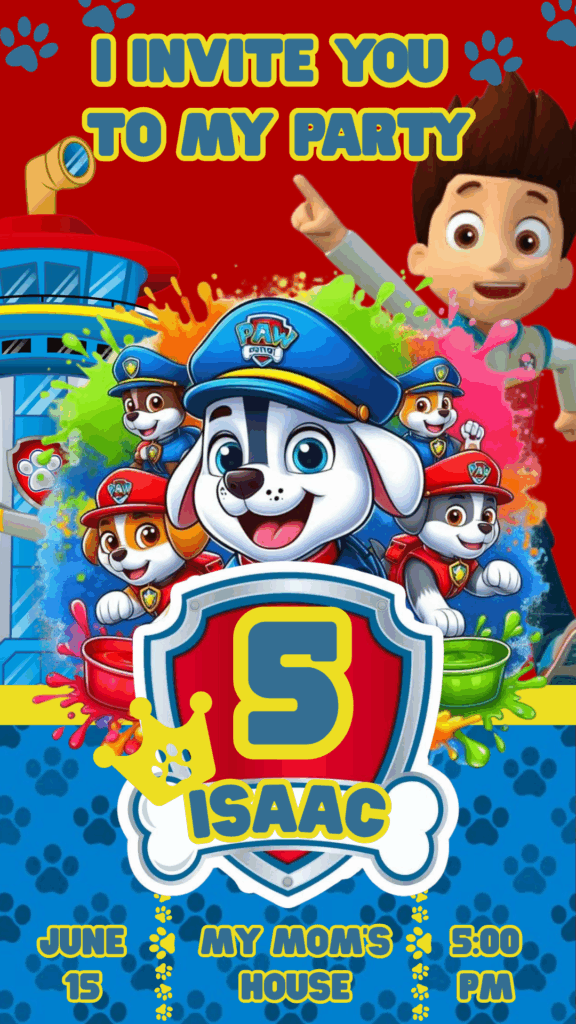
- Adorable Paw Patrol Characters: Featuring all the beloved pups – Chase, Marshall, Skye, Rubble, Zuma, and Rocky!
- Fully Customizable Text Areas: Easily personalize with the birthday child’s name, age, party date, time, location, and RSVP details.
- Adjustable Colors and Fonts: Tailor the card’s look to match your party theme or the birthday child’s favorite colors from Adventure Bay.
- Option to Add Personal Photos: Upload and integrate your own photos for an extra special and personalized touch.
- High-Resolution for Printing: Ensure your printed invitations look vibrant and professional, ready for delivery to all your little recruits.
- Optimized for Digital Sharing: Easily download in formats perfect for sending via email, social media, or messaging apps, spreading the word across Adventure Bay and beyond!
- Intuitive Canva Interface: Designed for easy editing, even for those new to online design platforms – no special pup training required!
How to Personalize Your Template
Personalizing your paw patrol invitation card in Canva is as easy as “Ruff! Ruff! Rescue!” Just follow these simple steps:
Select the File
Once you’ve chosen your favorite paw patrol invitation card template, simply click the provided link to open it directly within your Canva account.
Open and Edit
Canva’s easy-to-navigate editor will load the template. Here’s how you can make it your own:
- Modify Text: Click on the existing text boxes to change the wording, font style, size, and color. Add all the important party details to alert your little guests.
- Customize Colors: Select different elements and adjust their colors to match your party theme or the bright and cheerful colors of Paw Patrol.
- Upload Photos: Easily upload your own photos of the birthday hero and place them within the template for a personal touch.
- Move and Resize Elements: Adjust the placement and size of text boxes, images, and graphic elements to create your perfect layout, ensuring all the pups are in their right spots!
- Explore Additional Elements: Canva offers a vast library of free icons, illustrations, and shapes to further enhance your design (optional). Search for “Paw Patrol,” “pups,” or other party-related elements to add extra fun.
Save, Share, or Print
Once your paw patrol invitation card is ready for action:
- Save: Click the “Share” button in the top right corner and then select “Download.” Choose your preferred file format (PDF for high-quality printing, JPG or PNG for online sharing).
- Share: Directly share your design via email or social media using Canva’s integrated sharing options, sending the invitation to all your little recruits.
- Print: Download as a “PDF Print” file for the best printing quality. You can print them at your own Lookout or through a professional print shop.
Tips for a Paw-Some Invitation
- Proofread Carefully: Double-check all the text for any typos or errors before sending out your invitations – even Ryder makes sure his plans are perfect!
- Consider the Party Theme: If you have a specific Paw Patrol party theme, try to align the invitation’s design and colors with it, from specific pup themes to Adventure Bay locations.
- Use High-Quality Photos: If adding personal photos, make sure they are clear and well-lit, worthy of being displayed at the Lookout.
- Include All Necessary Information: Ensure you have clearly stated the date, time, location (even if it’s just your backyard!), and RSVP details so your little guests know when and where to report for duty.
Frequently Asked Questions
- Do I need a Canva Pro subscription to use these templates? No, our templates are designed to be fully editable with a free Canva account – no special gear needed!
- Can I edit these templates on my smartphone or tablet? Yes, Canva offers a user-friendly mobile app that allows you to edit your designs on any device, perfect for planning on the go.
- What’s the best file format for printing my invitations? For the best print quality, we recommend downloading your invitation as a “PDF Print” file, ensuring a vibrant and professional look.
- Can I add more Paw Patrol graphics to the template? Absolutely! Canva’s extensive element library allows you to search for and add additional Paw Patrol-related graphics to your design, making it truly unique.
Join Ryder and the Pups with the Perfect Paw Patrol Invitation Card!
Ready to create an invitation that will have all the little ones howling with excitement? Click here to explore our adorable collection of editable Canva paw patrol invitation card template options and start personalizing yours today! It’s the perfect way to kick off a birthday celebration filled with friendship, teamwork, and fun!