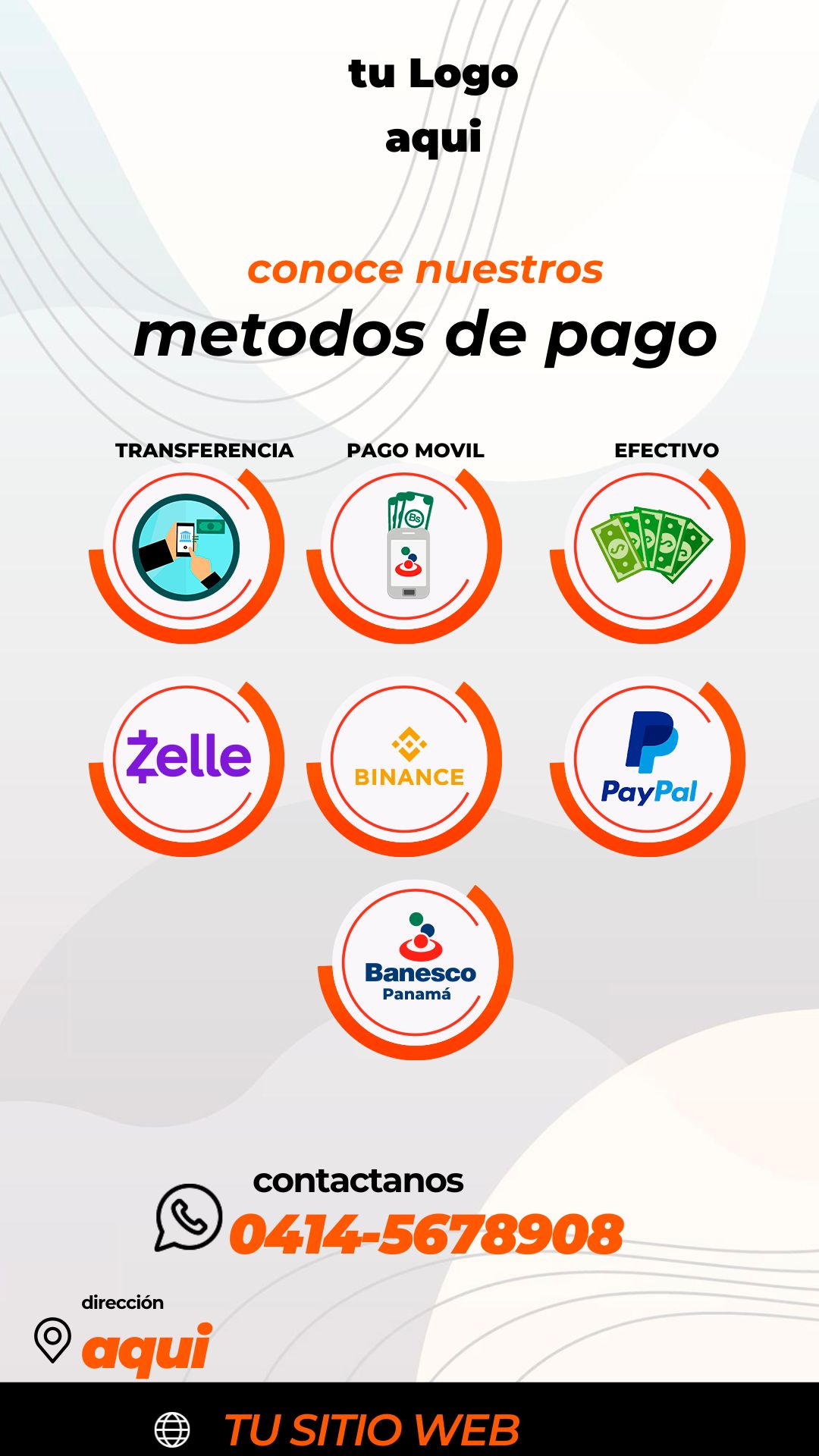
Providing clear and accessible payment options is crucial for any successful business. If you searched for “Flyer metodos de pago editable en canva y en psd,” you are looking for a versatile template that caters to both quick online editing and professional desktop design. We offer a premium solution available in two formats: the professional layered PSD file and the easy-to-use Canva version. This dual-format access ensures you can swiftly update your accepted payment methods, whether you require the precision of Adobe Photoshop or the convenience of the Canva web platform. Choose the format that best suits your needs and ensure your customers always know how to pay you.

¿Por qué elegir una plantilla editable PSD? (Why Choose Our Dual-Format Templates: PSD and Canva?)
Choosing our dual-format template ensures maximum versatility and quality control for your business:
- Format Flexibility: Get the speed and accessibility of the Canva editor for fast, minor updates, and the robust, high-resolution editing power of the PSD format for professional printing.
- Vector Icon Quality: The PSD template includes vector icons for major payment systems (Visa, MasterCard, PayPal, etc.), ensuring clarity and sharpness for any print size.
- Maximum Compatibility: Whether you are a small business owner using a free tool or a graphic designer using Adobe Photoshop, this package has the right file for you.
Note: While the Canva version is great for quick edits, the PSD file requires Adobe Photoshop installed on your computer for comprehensive professional editing and color management.
Características principales de esta plantilla PSD (Key Features of This Payment Methods Flyer)
This flyer template is designed specifically for clarity and business professionalism:
- Dedicated Icon Sections: Clear, organized spaces for showcasing all accepted payment methods (cards, cash apps, bank transfers, crypto).
- High-Contrast Design: Uses high-contrast color schemes to ensure payment icons and text are highly legible.
- Dual-Format Delivery: Receive both the native PSD file and the shareable Canva template link in the download.
Cómo personalizar tu plantilla PSD (How to Customize Your Template)
You have two main paths for customization, but here are the steps for the professional PSD file:
Descarga el Archivo (Download the File):
Download the compressed ZIP file containing your template from our secure resource bank. The ZIP includes the PSD file and the Canva link.
Descomprímelo (Unzip It):
Extract the contents of the ZIP file. You will find the PSD template, the Canva link, and the crucial text document (.txt).
Abre el archivo PSD (Open the PSD File):
Open the PSD template file using Adobe Photoshop (required for this format).
Instala la fuente (Install the Font):
Vital Step: The clear, business-friendly fonts used in this design are not included in the file due to licensing. You must open the accompanying .txt document, which provides external links to download the necessary typefaces. You must install these fonts on your computer before editing the text layers in Photoshop. For assistance with the process, please ensure you open this video tutorial in a new tab:
Click here for the font installation video tutorial (Opens in a new tab)
Edita las capas y textos (Edit Layers and Texts):
Use the Layers panel in Photoshop to select and highlight the payment methods you accept, or delete the ones you don’t. Adjust contact details and add your logo.
Guarda y exporta (Save and Export):
Save the final design as a high-quality PDF or TIF for printing, or as a JPG/PNG for sharing digitally at the point of sale or online.
Consejos (Tips)
- Icon Size: Ensure all payment icons are uniformly sized and clearly visible, especially if the flyer is small.
- Contact Info: Include key contact details (phone, email) for payment issues.
- Digital Use: For digital screens, save a separate version optimized for screen resolution to maintain clarity.
Preguntas frecuentes (FAQ)
Q: Do I have to use Adobe Photoshop to edit the PSD file?
A: Yes. The PSD format requires Adobe Photoshop for full access to layers and professional editing tools.
Q: Is the Canva version also included?
A: Yes. The download includes the link to the Flyer metodos de pago editable en canva y en psd template in the free-to-use Canva platform.
Q: Can I use this template for my online store?
A: Absolutely. It’s perfect for both physical businesses (printed display) and digital platforms (website footer, checkout page).
Llamado a la acción para editar (Call to Action)
Stop losing sales due to confusion! Download the Flyer metodos de pago editable en canva y en psd template now and clarify your payment options instantly!
[DOWNLOAD FREE DUAL-FORMAT PAYMENT METHODS FLYER]
Download “#0437 The Best ‘Editable Payment Methods Flyer in Canva and PSD’ Template for Business Transactions” 0437.zip – Downloaded 1 time – 3.63 MB